Personal Learning Device (PLD) Initiative @ BPGHS
Find out how BPGHS supports students through MOE's Personal Learning Device initiative, and access device guides, FAQs, and resources for parents.
Personal Learning Device (PLD) Initiative @ BPGHS
MOE’s National Digital Literacy Programme (NDLP) was launched in March 2020 for our schools and Institutes of Higher Learning. The NDLP aims to strengthen digital literacy for all learners and to ensure that students are well-equipped with the digital competencies to thrive in an increasingly technology-saturated future.
Under the NDLP, every secondary school student will own a school-prescribed Personal Learning Device (PLD).
Intended Outcomes
The use of the personal learning device for teaching and learning aims to:
Enhance Teaching and Learning
Support Self-Directed and Collaborative Learning
Support the Development of Digital Literacies
By equipping students with their own PLD, schools can:
Enhance Teaching and Learning: PLDs harness technology for greater effectiveness in teaching and learning, enabled by teachers’ use of e-Pedagogy to provide active learning experiences for students.
Support Self-Directed and Collaborative Learning: PLDs enable students to learn online according to their needs and interests, and to collaborate with each other, anytime and anywhere.
Support the Development of Digital Literacies: PLDs provide an immersive environment for students to develop the dispositions, knowledge and skills to thrive in the digital environment.
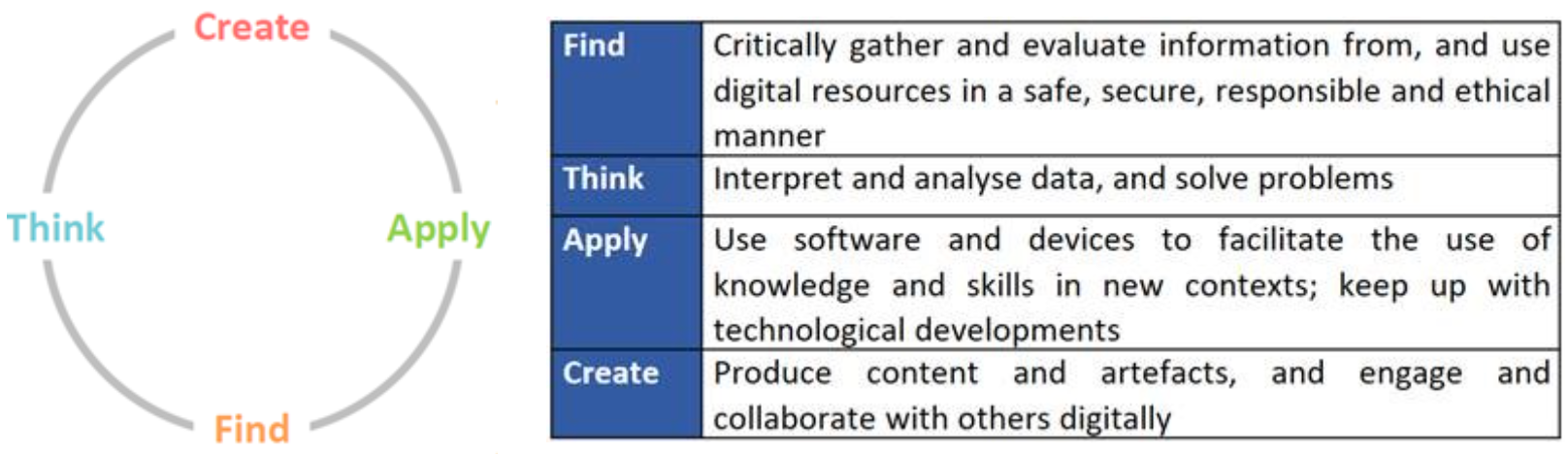
The 'Find, Think, Apply, and Create' Framework
Personal Learning Device (PLD)
Please click on the PDF files or links below for more information regarding the selected PLD.
For Secondary 1
Parent Engagement Deck 2026 (opens in new tab)
Procedures for Device Issues 2026 (opens in new tab)
To purchase Acer replacement accessories (opens in new tab)
For Secondary 2
Parent Engagement Deck (opens in new tab)
Procedures for Device Issues 2025 (opens in new tab)
To purchase Acer replacement accessories (opens in new tab)
For Secondary 3
Acer Travelmate B3 Spin 11 (opens in new tab)
Parent Engagement Deck (opens in new tab)
PLD Claims Process (opens in new tab)
For Secondary 4, 5
Microsoft-SurfaceGo3.pdf (opens in new tab)
Parent Engagement Deck for Sec 1 2022.pdf (opens in new tab)
PLD Claims Process.pdf (opens in new tab)
Student iCON
To reset your Student Icon password (if you have not set your security questions), or resolve issues related to your PLD, please approach the ICT Manager or Desktop Engineers at Level 2, ICT Student Services Hub.
Other technical information:
For information on the following, please click on the link to access the BPGHS ICT Portal (opens in new tab)
Information on bluetooth keyboard (For Microsoft Surface Go Users only)
Set up MIMS Challenge Questions
Others
Additional Resources for Parents
To support you in keeping your child safe online, you may refer to these additional resources:
Parent Handbook I (opens in new tab)and Parent Handbook II (opens in new tab)
Parent Kit on Cyber Wellness for Your Child (https://go.gov.sg/moe-cyber-wellness (opens in new tab))
Media Literacy Council (https://go.gov.sg/better-internet-sg (opens in new tab))
National Library’s Learning & Information Literacy Resources (https://sure.nlb.gov.sg/ (opens in new tab))
TOUCH Community Services (https://help123.sg (opens in new tab))
Frequently Asked Questions and Answers
A list of answers to Frequently Asked Questions can be found here:
2022 FAQ here (opens in new tab)
2024 FAQ here (opens in new tab)
If you have any further queries, kindly email us at:
Contact Details
ICT Matters | PLD and MIMS Matters | Administrative & Financial Matters |
|---|---|---|
Ms Sherlyn Tan | Ms Dewi (ICT Manager) dewi_rosyati_sheik@moe.edu.sg | Mdm Zainah |